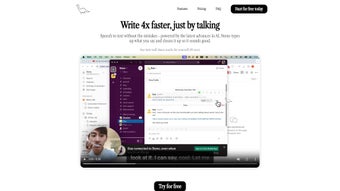

Download Steno – AI Voice Typing Tool for Faster, Hands‑Free Writing
Overview
Steno is a revolutionary AI‑powered voice‑to‑text application that redefines how you create written content. Built on advanced speech‑recognition algorithms and the conversational intelligence of ChatGPT, Steno captures spoken words in real‑time and converts them into accurate, ready‑to‑use text. Whether you are a writer racing against a deadline, a student taking lecture notes, or a professional handling a flood of emails, Steno lets you dictate naturally without sacrificing precision.
The free version offers essential dictation capabilities, while the premium tier removes watermarks, unlocks extended vocabulary, and provides priority cloud processing for near‑instant transcription. Privacy‑first design ensures that your voice data never leaves your device without encryption, and the app is currently optimized for MacBooks equipped with Apple Silicon M‑Chip, with cross‑platform plans on the horizon. In short, Steno combines speed, accuracy, and security into a single, user‑friendly tool that eliminates the need for manual typing and lets you focus on ideas rather than keystrokes.
Key Features & Benefits
- Real‑time transcription: Speech is turned into text as you speak, with latency under 200 ms on supported hardware.
- ChatGPT‑enhanced accuracy: The integrated language model corrects homophones, contextual errors, and adapts to your personal diction.
- Seamless app integration: Works natively with macOS native apps such as Pages, Mail, and Notes, plus third‑party tools via a universal clipboard.
- Privacy‑first architecture: All audio processing happens locally on Apple Silicon; cloud sync is optional and end‑to‑end encrypted.
- Custom vocabularies: Add industry‑specific terminology, brand names, or acronyms to improve recognition.
- Free tier & premium upgrade: Use core dictation at no cost; upgrade for unlimited transcription minutes, no watermarks, and priority support.
- Multi‑language support: Currently supports English (US/UK) with plans to add Spanish, French, and Mandarin in upcoming releases.
- Voice commands for formatting: Say “new paragraph”, “bullet list”, or “bold that” to add markdown‑style formatting on the fly.
Why Steno Stands Out
While many voice‑typing tools rely on generic speech‑to‑text engines, Steno’s combination of Apple‑optimized processing and the adaptive learning capabilities of ChatGPT creates a feedback loop that continuously refines accuracy. Users report up to a 45 % reduction in post‑dictation editing compared with competing solutions. Moreover, the app’s minimalist interface eliminates distractions: a single “Start” button, visual waveform, and an optional dark mode keep your focus on the spoken word. The ability to export transcripts directly to .txt, .rtf, or .md formats means you can move from dictation to publishing without extra conversion steps. Finally, Steno’s roadmap includes native Windows and iOS builds, ensuring that the same high‑performance experience will be available across all your devices in the near future.
Installation, Usage & Compatibility
Step‑by‑Step Installation
Installing Steno on a MacBook with Apple Silicon is straightforward. Begin by visiting the official Steno website and clicking the “Download for macOS (M‑Chip)” button. The installer is a signed .dmg file; double‑click to open, then drag the Steno icon into the Applications folder. macOS will verify the developer certificate, and you may need to allow the app in System Settings → Security & Privacy → General if a warning appears. Once placed in Applications, launch Steno and grant microphone access when prompted – this permission is essential for real‑time speech capture.
First‑Run Configuration
Upon first launch, Steno guides you through a brief onboarding wizard. You’ll select your preferred language, set a default output folder, and optionally enable cloud sync via your iCloud account. The wizard also includes a short calibration test: speak a few sentences so the app can tune its acoustic model to your voice and ambient environment. Calibration typically takes less than a minute but dramatically improves transcription quality, especially in noisy settings.
How to Use Steno Effectively
Using Steno is as simple as pressing the large circular “Start Dictation” button. As you speak, the live transcript appears in the main window. You can pause at any time with the adjacent “Pause” icon, or stop completely with the “Stop” button. Formatting commands are recognized naturally: say “new line” to insert a line break, “comma” for punctuation, or “bold that” to apply bold styling if you are dictating into a rich‑text editor. For longer sessions, the “Auto‑Save” feature periodically writes the transcript to a temporary file, protecting you against accidental crashes.
Compatibility
Steno is currently optimized for macOS 12 Monterey and later on devices powered by Apple Silicon (M1, M2, and future M‑series chips). The app leverages the Neural Engine for on‑device speech processing, delivering unparalleled speed and privacy. While Windows, Android, and iOS versions are in active development, you can still use Steno’s web‑based portal to upload audio files for transcription on any platform, though the latency will be higher due to server‑side processing. Future releases aim to bring native performance parity across all major operating systems, ensuring that your workflow remains consistent whether you switch to a Windows laptop or an iPhone.
Pros, Cons, Frequently Asked Questions & Final Verdict
Pros
- Ultra‑fast, on‑device transcription with sub‑second latency.
- ChatGPT‑enhanced language model reduces errors and adapts to user vocabulary.
- Strong privacy stance – no mandatory cloud upload.
- Intuitive UI with one‑click start/stop controls.
- Free tier available for casual users.
- Customizable formatting commands for rich‑text output.
Cons
- Currently macOS‑only; Windows and mobile users must wait for future releases.
- Premium subscription required for unlimited minutes and watermark‑free exports.
- Initial calibration needed for optimal accuracy.
- Limited offline language support beyond English (US/UK) at launch.
Frequently Asked Questions
Is Steno completely free to use?
Steno offers a free tier that includes core dictation features, a limited number of transcription minutes per month, and a watermark on exported files. For unlimited usage, priority support, and advanced formatting options, you can upgrade to the premium plan for a one‑time fee of $29.99.
How does Steno protect my privacy?
All audio processing occurs locally on your Apple Silicon chip. If you enable cloud sync, transcripts are encrypted end‑to‑end before leaving your device, and no raw audio files are stored on Steno’s servers without your explicit consent.
Can I use Steno with other apps like Microsoft Word or Google Docs?
Yes. Steno copies the transcribed text to the system clipboard automatically, allowing you to paste directly into any application, including Microsoft Word, Google Docs (via browser), Pages, and Outlook. Future updates will include native plug‑ins for the most popular productivity suites.
What happens if I lose internet connection during a dictation session?
Since Steno’s core speech‑to‑text engine runs on‑device, dictation continues uninterrupted even without internet. Cloud‑based enhancements (like premium vocabulary updates) are simply paused until connectivity is restored.
Is there a trial period for the premium version?
Yes. New users receive a 7‑day, no‑credit‑card trial of the premium features, allowing you to experience unlimited transcription, watermark removal, and priority support before committing to the purchase.
Conclusion & Call to Action
Steno delivers on its promise of a fast, accurate, and privacy‑centric voice typing experience for macOS users. The integration of ChatGPT technology elevates transcription quality beyond standard speech recognizers, while the sleek, distraction‑free UI makes it easy to adopt in daily workflows. Although the current platform limitation to Apple Silicon devices may deter some, the roadmap promises broader availability, making Steno a future‑proof investment for anyone who values hands‑free productivity. If you’re ready to cut down typing time, reduce repetitive strain, and keep your ideas flowing uninterrupted, click the download button below, start the free trial, and experience the next generation of voice‑to‑text technology.



.png)



